


Program box for Konect RS8 and RS10 ELITE speed controller images


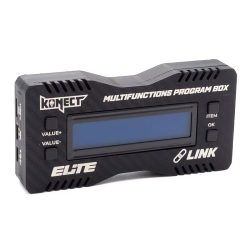
Program box for Konect RS8 and RS10 ELITE speed controller

Program box for Konect RS8 and RS10 ELITE speed controller
The must have tool to perfectly configure your Konect RS8 and RS10 ELITE controller!
It lets you easily connect to your ESC and read/modify all parameters.
Comes with a French/english language user manual and the connection cable to the speedo.
New LINK version, allowing you to update your board via PC, as well as your inverter.
User Manual: KONECT Elite USB LINK
The KONECT Elite USB LINK is a versatile programming card designed to configure and update KONECT electronic controllers (ESC). It also serves as a communication interface between your hardware and a computer via the dedicated software Elite USB LINK.
1. Standalone mode (on the track)
This mode allows you to perform all essential adjustments directly on the racetrack, without needing a computer.
Physical Interface (4 buttons)
-
ITEM : Allows you to scroll through the available parameters.
-
VALUE + : Increases the value of the selected parameter.
-
VALUE − : Decreases the value of the selected parameter.
-
OK : Confirms the selected value and saves it.
Operating principle
-
Navigation : By pressing ITEM, you scroll through the options one by one.
-
Modification : Once the parameter is chosen, use VALUE + and VALUE − to adjust its value.
-
Validation : Press OK to confirm and apply the setting.
The built-in screen displays in real time :
-
The number of the parameter currently being edited.
-
The selected value.
-
The confirmation of the changes applied.
2. Use with Elite USB LINK software (PC)
In this mode, the card acts as a bridge (USB interface) between the hardware and the PC software for more advanced configuration.
Connection to PC
-
Connect the card to the PC via a USB cable.
-
Launch the Elite USB LINK software.
-
Select the product type:
-
Pro Link : to configure the card itself.
-
ESC : to configure a controller.
-
-
Click Open.
Card firmware update
-
Connect the card by itself via USB (no connection to the ESC is required).
-
In the software, select Pro Link > Open.
-
Access the menu Firmware update.
-
Select the version and click on Update.
3. Configuration and updating an ESC
To modify fine settings or update the internal firmware of your controller:
-
Branchement : Connect the ESC to the programming card.
⚠️ IMPORTANT : Please strictly observe the polarities S / + / −. Reversing them will prevent any communication.
-
Liaison PC : Connect the card to the PC via USB.
-
Software : Select ESC then click Open.
Possible actions :
-
Modify and save the ESC settings.
-
Update the ESC firmware.
-
Importer/Exporter : Use the Export Params buttons (generates a
.txtfile) and Import Params to save or load your profiles with one click.
4. Mappings and Help
The software follows exactly the navigation logic of the physical card :
-
ITEM → Selecting a row or a parameter.
-
VALUE + / − → Sliders, buttons or drop-down menus.
-
OK → Validation and saving.
Simulator and advanced aids
A software simulator is available at the bottom of the page for:
-
Discover the interface without hardware.
-
Understand the role of each parameter via tooltips and detailed descriptions.
-
Explore the menus safely.
-
Brand

-
ReferenceKN-RS-PROG-LINK
-
EAN133700624562164

No question is available on this product.
But if in case you have any doubt you can raise your query.
Ask question

from 100 to 3000€


Coupons for every spent onsite
-
Have a question?
Get answers from customers who have used this item
4 other products in the same category


